How Does a Fax Machine Work? (And How Online Fax Works)
$0.99 covers up to 10 pages, pay only if delivered.
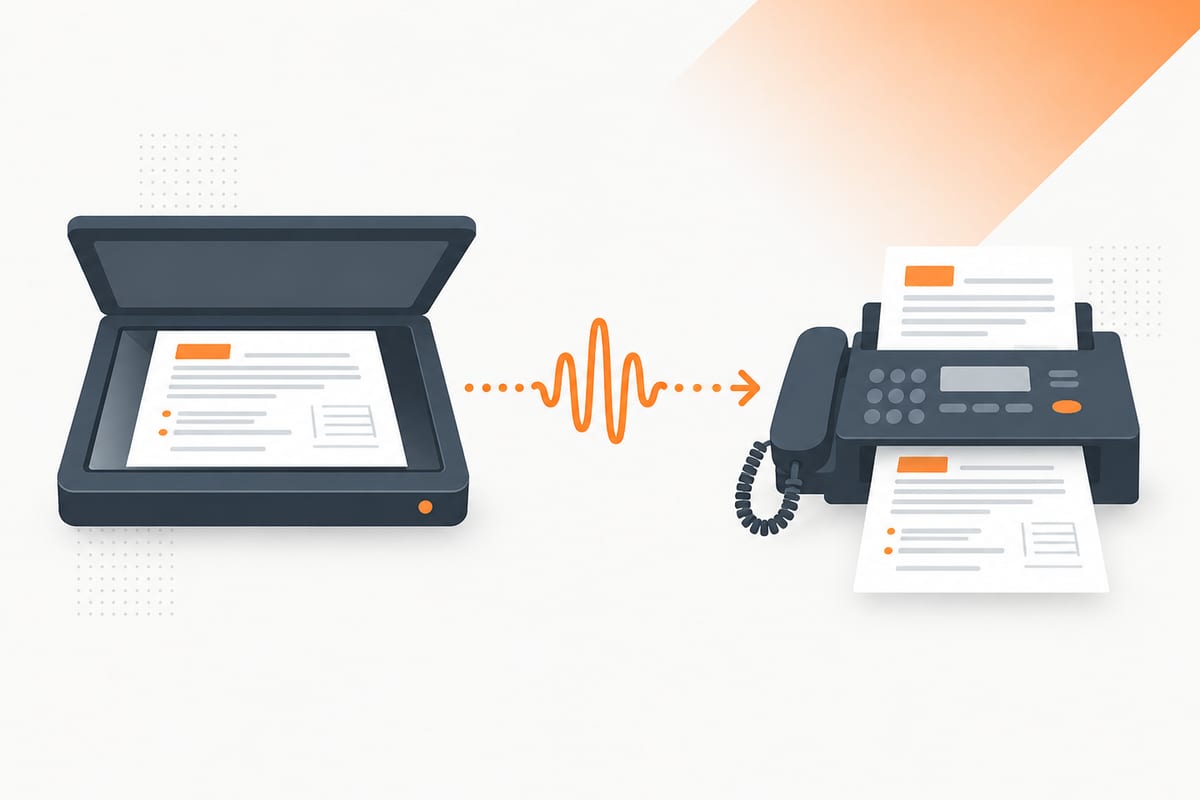
Want the practical steps? Start with how to send a fax. This page explains what happens between upload and delivery, why fax tones sound strange, and how machine fax differs from online fax. Standards, manufacturer specifications and historical sources were checked on 8 October 2026.
Need to send an ordinary document? Review a one-time fax quote. $0.99 covers up to 10 pages, pay only if delivered.
To check existing equipment before switching, follow the fax machine test guide with a harmless page and test both directions.
What is a fax?
“Fax” is short for facsimile: a reproduction of a document. The important idea is that the receiving side gets the page's appearance. A normal fax does not deliver an editable Word document, a spreadsheet formula or an interactive PDF form to a conventional machine.
In everyday use, the word can mean the transmission, the received document or the machine. “Please fax the form” asks for a transmission; “the fax arrived” refers to the resulting pages. The underlying task is the same: reproduce the sender's document at a destination that accepts fax.
A fax number is a telephone number answered by suitable equipment or a service. Its format follows the telephone numbering plan, rather than a special universal fax prefix. A number printed beside “Telephone” does not automatically accept fax calls; verify the recipient's direct fax number.
Email and fax can be connected through a gateway, but they remain different steps. An email-to-fax provider turns attachments into a fax transmission. Ordinary email to a series of digits does not automatically call a machine. Likewise, a phone camera creates a scan; a fax service must still transmit it.
How a fax machine works, step by step
The machine handles document preparation and a fax connection. Some details vary by model and network, but the useful sequence is:
- Capture the page. The scanner reads the paper and creates a page image.
- Prepare the image data. The fax equipment encodes the image for transmission.
- Call the recipient. It dials the destination fax number through its configured connection.
- Agree the transmission. The endpoints exchange capabilities and establish compatible settings.
- Transmit and rebuild the pages. The recipient receives the fax image and prints or stores it.
- Report the result. The sender records whether the transmission completed successfully.
The scanner and telephone connection are separate parts of this process. A machine can produce a perfectly good scan yet fail to make a call because the line is disconnected. It can also connect successfully but send a poor image because the original was faint or cropped.
That distinction helps with troubleshooting. If the machine has no dial tone, investigate the connection and model instructions. If the recipient gets unreadable pages, inspect the original and the scan. If the number answers as voice, confirm that it is actually the right fax endpoint.
Many office machines store scanned pages before transmission, and controls differ by model. Do not infer page orientation from the word “fax”: feeders and flatbeds can require different loading. Check the diagram or manual and keep your originals until you have the final result.
The handshake: why fax makes that sound
The tones are part of the communication, rather than a person reading your document aloud. The endpoints establish the call and exchange the information needed to send compatible pages. ITU-T T.30 defines the procedures for conventional document fax transmission, including the capability exchange and result signaling.
You can think of the handshake as two devices agreeing how to communicate before transferring the document. They do not simply send an arbitrary audio recording of the page. The sending and receiving capabilities, connection conditions and agreed settings affect what happens next.
In an online workflow, the provider handles this exchange. Your browser may already have finished uploading the PDF while the fax connection is still being established. That is why a quick upload or payment receipt does not establish delivery.
Hearing a fax tone while calling a number can suggest fax equipment answered, but it does not verify the person, department or organization behind the number. Do not use a tone as your only destination check, especially for tax or medical documents. Use current official contact information.
If a call fails during negotiation, the source document can still be perfectly valid. Repeatedly changing a signature or cover sheet will not repair an unavailable destination. Review the final error, check the number and follow the equipment or service's retry guidance.
Fax resolution and speed
Fax resolution describes the image detail sent to the recipient. It is distinct from the original scanner's maximum resolution and from a printer's advertised print quality. A high-resolution source can be prepared at a lower fax resolution during transmission.
ITU-T T.4 describes Group 3 document fax terminals. Its standard vertical resolution is 3.85 lines per millimeter, with an optional higher resolution of 7.7 lines per millimeter. For a concrete machine example, Brother's MFC-L9610CDN specifications list 203 dpi horizontally, 98 dpi vertically for Standard and 196 dpi vertically for Fine. These are examples of documented fax modes, not a promise about every provider's output.
| Example mode on that Brother model | Horizontal detail | Vertical detail | Practical consideration |
|---|---|---|---|
| Standard | 203 dpi | 98 dpi | Check that small text remains readable |
| Fine | 203 dpi | 196 dpi | More vertical detail for a suitable original |
| Super fine | 203 dpi | 392 dpi | Requires compatible transmission settings |
Brother's resolution guidance notes that Fine is useful for small print and can transmit more slowly than Standard. Its model specifications also list a 33,600 bps modem with automatic fallback. That maximum is a capability, rather than a guaranteed speed on every call.
For your document, the practical priority is readability. Inspect a scan at ordinary reading size before sending. Enlarging an out-of-focus image does not restore missing detail, and an extremely dark page can hide a signature just as easily as a faint one.
For planning, allow about 30 seconds to 1 minute per ordinary text page, plus dialing and connection setup. Fine resolution, photos, recipient availability and retries can take longer. Our fax timing guide compares per-page estimates and explains how to confirm delivery. Allow time for a failed attempt and keep the final result.
How online fax works
An online service supplies the fax endpoint and connection. You provide the document through a browser, supported app or email gateway; the service prepares fax pages and transmits them to the destination. You can use a computer or phone with internet access without installing your own modem.
The broad path is your file → fax service → receiving fax endpoint. Telecom networks can include IP gateways as well as traditional telephone connections. ITU-T T.38 specifically covers real-time Group 3 fax communication over IP networks. Do not assume that every provider or every call uses the same protocol throughout its entire path.
The recipient can use a conventional machine or an online receiving number. They do not need your app or browser. From their perspective, the important questions are whether the correct pages arrived, whether they are readable and whether they meet the recipient's submission rules.
| Stage | What has happened | What it does not prove |
|---|---|---|
| Upload completed | The sender received your file | Fax call completed |
| Packet preview ready | The document has been prepared | Recipient received it |
| Checkout completed | Payment step was completed under the displayed terms | Successful transmission |
| Final successful fax result | Transmission succeeded to the reported endpoint | Staff read it or approved an application |
For SingleFax's ordinary browser route, upload the document, enter the verified recipient number, inspect the preview and quote, then complete checkout. Sending starts at $0.99 for up to ten document pages, with $0 if delivery fails.
Our no-machine guide compares browser, phone, email and store methods. The computer guide explains how to prepare a PDF or Word file and how hardware fax differs from an internet service.
Incoming online faxes work in the other direction
The sender calls your online receiving number. The service answers, receives the fax and makes the document available digitally. Depending on the product, that can mean a PDF in email, a dashboard document or a protected workflow with different notification rules.
You need a receiving number for that exchange. Owning one is separate from sending a one-time fax to someone else. A voice-only number or personal email address does not become an inbound fax endpoint merely because you publish it on a form.
SingleFax's free 24-hour US number requires verified email and has usage caps: one active number, up to three claims in a rolling 30 days and 25 free inbound pages across those claims. Extra faxes are held for paid viewing. Choose a longer-lived number if the expected reply may arrive after the temporary window.
Need to send an ordinary document? Review a one-time fax quote. $0.99 covers up to 10 pages, pay only if delivered.
Why fax is still used in 2026
Fax remains useful where a recipient explicitly accepts or requests it. That can include government forms, healthcare exchanges and business paperwork. The practical reason to fax is the receiving organization's workflow, rather than an assumption that fax is always safer or more legally effective than every alternative.
The IRS's Form 2553 instructions, for example, describe a fax filing route. The document still needs the required signatures and correct office. A fax result does not replace the later election acceptance process.
Healthcare is another example. HHS permits treatment communications by fax with reasonable safeguards, including verifying unfamiliar numbers. That permission does not turn every fax app into a compliant business service. Access controls, the service relationship and a required BAA still matter for covered entities and business associates.
Some organizations also keep fax because their partners already have established receiving numbers and staff procedures. Migrating the sending side to a browser can preserve that contact method while removing a local machine. Changing the receiving side requires more planning because other people need to know which number to use.
Copper retirement and the move to online fax
The FCC provides consumer guidance on the transition from copper to fiber. That does not establish a single nationwide shutoff day for every fax line. Check your carrier's notice and the actual service supporting your equipment before assuming an existing machine will continue unchanged.
Our POTS and cloud migration guide covers planning. Inventory who sends and receives, which numbers appear on forms, which departments need access and how you will test delivery. A successful voice call on a replacement connection does not by itself prove every fax workflow works.
For a one-time send, a browser can avoid that equipment decision. For a business's published number, plan a supported transition and keep the old service active until the new arrangement has been verified. Check porting eligibility and availability before promising that a particular number can move.
When was the fax machine invented? A brief history
Early facsimile devices predate the familiar office fax machine and used different mechanisms. It is more accurate to describe a sequence of developments than to treat a modern machine as one unchanged nineteenth-century invention.
Alexander Bain's 1843 specification: the original US patent preserved by the German Patent and Trade Mark Office explicitly references Bain's British specification dated 27 May 1843. It describes electrically reproducing a surface at a distance. That is direct historical evidence of an early facsimile approach, rather than a claim that today's office machine already existed then. Read the patent.
Caselli's pantelegraph and the 1865 service: Italy's national science and technology museum documents Giovanni Caselli's pantelegraph and a service begun on the Paris-Lyon route in 1865. Its catalog explains the synchronized transmitting and receiving mechanisms. These devices used telegraph infrastructure and differ from telephone fax. Read the museum catalog.
The later standards explain the interoperability familiar to office fax users: terminals need shared image and communication procedures to exchange pages. Online services change how you submit and collect documents while retaining a fax connection to compatible recipients. The continuity is document reproduction at a distance; the equipment and networks have evolved.
Is a fax machine a printer or a scanner?
A typical standalone fax machine includes scanning for outgoing pages, printing for incoming pages and the communications components needed for fax calls. A multifunction office device may combine those with normal computer printing and copying.
Those functions remain distinct. Copying scans a page and prints it locally. Scanning saves a document. Printing puts an existing digital file on paper. Faxing transmits a document to another fax endpoint and produces a transmission result.
| Action | Output | Requires a remote fax endpoint? |
|---|---|---|
| Scan | Digital image or PDF | No |
| Copy | Local printed reproduction | No |
| Paper from a digital file | No | |
| Fax | Document at a receiving endpoint | Yes |
Check a device's model specifications before assuming a printer-scanner can fax. A Fax button also needs its supported connection or service configured. If you already have a scan, you can often upload it to an online sender instead of adding a physical fax line.
What fax confirmation tells you
When keeping records, note the confirmation's date, time zone and destination as well as the result. A file's last-edited date is not the transmission date, and an email's arrival time can differ from the fax completion time. Retain the exact sent version so that a later revision cannot be mistaken for the pages covered by an earlier confirmation.
Keep the final transmission result and match its destination and page count to your packet. An upload message or sent email is evidence of an earlier step. A successful fax result is evidence about transmission to the reported endpoint.
It does not prove that a particular person read the pages, that the packet was complete for an application or that the recipient approved it. A wrong number can accept a fax successfully. That is why verification belongs before sending and processing follow-up belongs after it.
For an incomplete transmission, some pages may already have arrived. Contact the recipient when duplicate or missing pages could cause confusion, and agree whether to resend the complete packet. Do not assume a final failure means the recipient saw nothing at all.
A practical example: sending a signed form
Suppose a recipient asks for a signed five-page form by fax. First, confirm its direct fax number and whether it wants a cover. Sign the required pages, scan the complete packet and open the PDF to check its order and edges.
Next, upload that PDF to the sender. A prepared preview lets you catch a missing back page or a crooked scan before checkout. Enter the verified destination and review the quote. The service handles the fax call after the required sending steps are complete.
Finally, keep the transmission result alongside the exact PDF. If the recipient also promises an acknowledgement, wait for or request that through its stated procedure. The fax connection and the organization's internal review are separate parts of the exchange.
If the form contains confidential information, minimize the cover details and choose the appropriate workflow. A cover can help routing but cannot correct a wrong destination or replace a required agreement. For a full walkthrough, use how to send a fax; for a routing page, start with the free cover sheet tool.
Common questions
Sources
- ITU-T T.30: Fax transmission procedures
- ITU-T T.4: Group 3 document fax terminals
- ITU-T T.38: Real-time fax over IP networks
- Brother MFC-L9610CDN: Fax resolution and modem specifications
- Brother: Resolution and transmission tradeoffs
- DPMA: Alexander Bain's patent referencing his 1843 British specification
- Museo Nazionale Scienza e Tecnologia: Caselli's pantelegraph
- IRS: Fax filing of Form 2553
- HHS: Treatment communications by fax and reasonable safeguards
- FCC: Transition from copper to fiber